第 7 节 · Function Calling 协议:Tool Schema 与消息流
一句话回答
Function Calling 协议把"让 LLM 调工具"从"prompt 字符串约定"升级到了"结构化字段"——模型只负责提出工具调用请求,真正执行工具的是你的程序。
整个协议就两件东西要看懂:
- Tool Schema:你怎么告诉 LLM "你有什么工具能用"
- 4 种角色的消息流:一次完整调用怎么在
messages里来回交互
NOTE
本节讲的是 OpenAI Chat Completions 风格的协议,因为它最适合看清底层消息流。到 2026 年,新项目也常用 Responses API、Agents SDK 或 MCP 连接器,但它们的底层思想仍然类似:把工具描述给模型 → 模型返回结构化调用 → 程序执行 → 结果喂回模型。
先划清边界:协议不等于执行
Function Calling 这个名字容易误导新手。模型并不会真的执行 Python 函数,它只会返回一段结构化数据:
tool_calls=[{
    "name": "get_weather",
    "arguments": {"city": "北京"},
}]接下来所有高风险、确定性的事都发生在你的程序里:
- 解析参数
- 校验权限
- 调用真实函数 / API / 数据库
- 捕获错误
- 把结果作为
tool消息塞回messages
所以,Function Calling 是"模型提议调用",不是"模型获得执行权"。这也是为什么生产 Agent 必须有权限、沙箱、日志和人工确认。
Tool Schema:给 LLM 的工具说明书
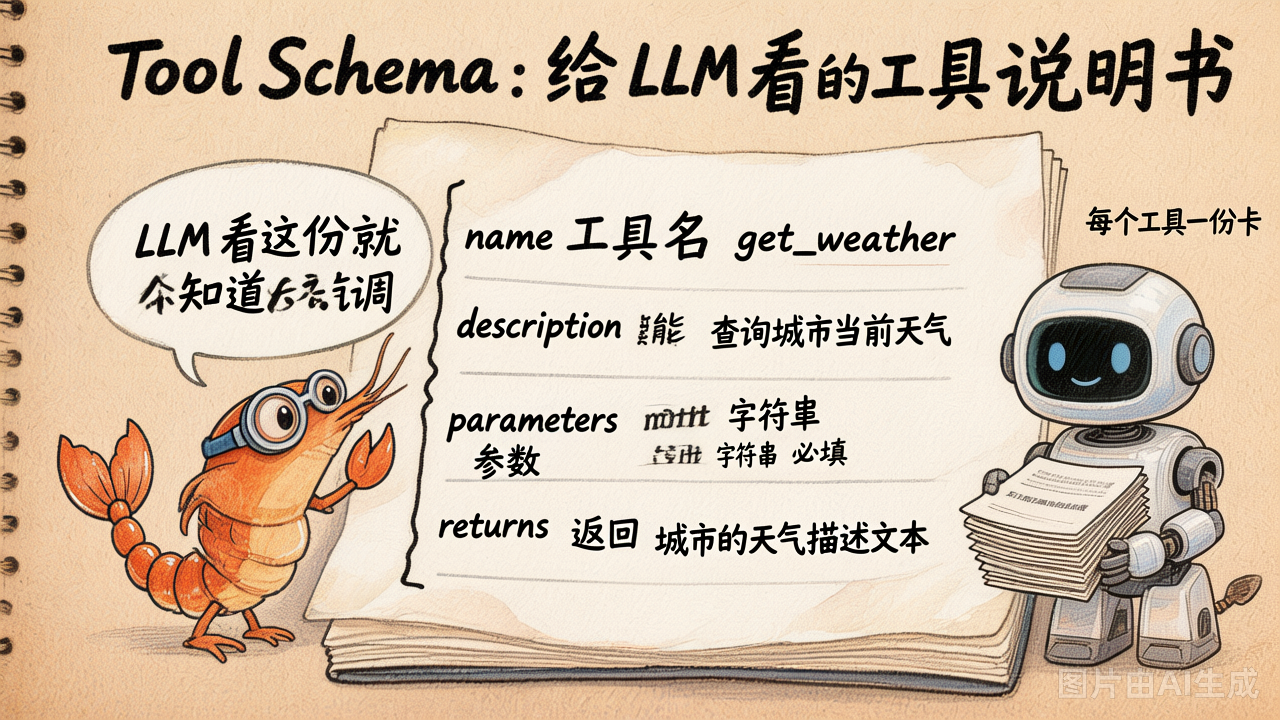
每个工具要"上线",必须先写一份机器可读的说明书。OpenAI 的标准格式长这样:
{
    "type": "function",
    "function": {
        "name": "get_weather",                       # 工具名
        "description": "查询指定城市的当前天气",        # 干什么用的
        "strict": True,                              # 严格按 schema 产出参数
        "parameters": {
            "type": "object",
            "properties": {
                "city": {
                    "type": "string",
                    "description": "城市名,例如 '北京'",
                }
            },
            "required": ["city"],
            "additionalProperties": False,
        },
    },
}LLM 拿到这份 schema 之后就学会了四件事:
- 这个工具叫
get_weather - 它能"查询城市当前天气"——所以遇到天气问题就该想到它
- 调它必须传一个字符串
city - 严格模式下,不能偷偷多传
date、unit之类 schema 里没有的字段
重点:LLM 看不到你函数体里的代码。它只看 schema。所以
description字段写得好不好直接决定模型用得对不对。 一个常见错误:description 写得很简略 → 模型不会用 / 用错。
2024-2026 Structured Outputs:`strict: true`
2024 年 8 月起,OpenAI 支持在 tool schema 中设置 "strict": true,让模型输出的工具参数严格遵守 JSON Schema。2026 年的官方文档也建议优先打开严格模式。
"function": {
    "name": "get_weather",
    "strict": True,       # ← 保证输出严格匹配 schema
    "parameters": { ... }
}使用 strict 时要注意:
- 每一层 object 都要写
additionalProperties: False - 所有
properties都要列入required - 真正可选的字段通常用
["string", "null"]这类 nullable 类型表达 - 它保证参数形状,不保证业务含义一定正确
本课程 demo 为兼容更多 OpenAI-compatible 服务,仍保留较朴素 schema;生产环境优先使用严格 schema。
跨厂商兼容性
本节用的是 OpenAI Chat Completions 格式(tools + tool_calls + tool 消息)。许多 OpenAI-compatible API 会直接兼容这套字段。Anthropic(Claude)和 Google(Gemini)的原生 API 概念相同但字段名略有不同,例如 Claude 用 tool_use / tool_result。本课程统一用 OpenAI 格式教学,切换厂商时主要改字段映射。
Tool Schema 长在哪里?
调 LLM 时多传一个 tools 参数:
resp = client.chat.completions.create(
    model=MODEL,
    messages=messages,
    tools=[ ... 上面那个 schema ... ],   # ← 这里
    tool_choice="auto",                  # 让模型自己决定要不要调
)tool_choice 有 4 种取值:
| 取值 | 含义 |
|---|---|
"auto"(默认) | 模型自己决定调不调 |
"none" | 这次绝对不要调工具 |
"required" | 这次至少调一个工具 |
{"type": "function", "function": {"name": "xx"}} | 这次必须调 xx |
入门和大多数普通场景用 auto 就够。如果你在做评测、强制走某个流程,才需要显式指定。
还有一个容易忽略的参数:
parallel_tool_calls=False它表示一次 assistant 响应最多返回 0 或 1 个工具调用。默认允许并行工具调用,更适合效率;关闭并行更适合教学、调试和某些必须严格串行的业务。
2026 的接口现状:Chat Completions、Responses API 与 MCP
你会在资料里看到几套名字,不要被吓到:
| 层次 | 它解决什么 | 和本节关系 |
|---|---|---|
Chat Completions tools | 最直观的 Function Calling 消息流 | 本节主讲,适合入门 |
| Responses API | 把文本、工具调用、内置工具、推理过程统一成 item-based 输出 | 新项目常用,但概念仍是工具调用 |
| Agents SDK | 帮你封装循环、状态、handoff、guardrails、tracing | 省代码,但底层仍要懂协议 |
| MCP | 标准化"工具/资源/提示词"怎么暴露给 AI 应用 | 解决工具从哪里来,不替代工具调用本身 |
可以这样理解:
Function Calling 是模型和你程序之间的"调用协议";MCP 是工具服务器和 AI 应用之间的"连接协议";Agents SDK 是帮你把循环和观测封装起来的"工程框架"。
还有一个 2026 年常见差异:Chat Completions 里的 function 默认是非严格模式;Responses API 会更积极地把 function schema 规范化为严格模式。如果你迁移接口,尤其要检查可选字段和 additionalProperties。
本课程先从 Chat Completions 学起,是因为它把每条消息都摊开给你看,最适合建立心智模型。
四种角色的消息流
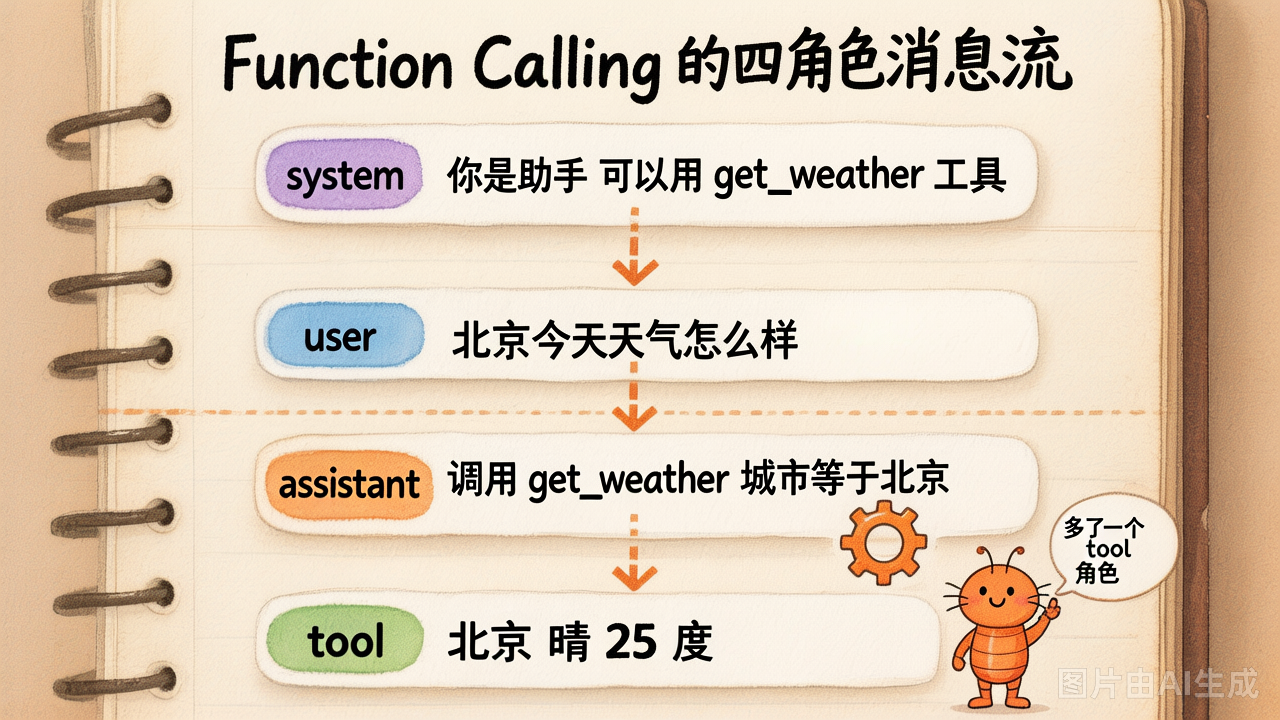
Day1 我们见过 3 种角色:system / user / assistant。 Function Calling 多了第 4 种:tool。
一次完整调用,messages 里至少有 4 条消息:
[1] system    "你是助手,可以用 get_weather 工具"
[2] user      "北京今天天气怎么样?"
[3] assistant content=None
              tool_calls=[ {id:"call_001", name:"get_weather", args:{"city":"北京"}} ]
[4] tool      tool_call_id="call_001"
content="北京 晴 25°C"然后再调一次 LLM,模型基于这 4 条消息生成最终回答:
[5] assistant "北京今天晴朗 25°C,建议短袖加薄外套。"五个最容易踩的坑
坑 1:assistant 的 content 可以是 None
模型决定调工具时,content 经常是 None 或空字符串——真正的"指令"藏在 tool_calls 字段里。新手经常打印 msg.content 看到 None 就以为模型死了。
坑 2:assistant 消息必须原样追加回 messages
很多人调完 tool_call 后只把工具结果作为 tool 消息追加,忘了把 assistant 那条带 tool_calls 的消息也追加。结果第二次调用时模型看不到自己刚才"决定要调什么",会重头来过。
坑 3:tool 消息必须配 tool_call_id
{"role": "tool", "tool_call_id": "call_001", "content": "北京 晴 25°C"}这个 tool_call_id 必须和上一条 assistant 里 tool_calls[*].id 严格对应,否则模型不知道哪个结果对应哪个调用——尤其当一次 assistant 消息里同时有多个 tool_call(并行工具调用)时尤其关键。
坑 4:schema 正确不等于结果正确
strict: true 只能保证参数长得像 schema:
{"city": "北京"}它不能保证:
- 城市名一定存在
- 用户真的有权限查这个数据
- 外部 API 一定成功
- 工具返回一定可信
这些仍然是你的程序要处理的事。
坑 5:把工具结果塞太多上下文
工具返回的是 tool 消息内容,也会占用 token。生产环境里不要把 10MB 的日志、完整网页、整张表直接塞回模型;应该先在工具层过滤、摘要或分页。否则 Agent 会慢、贵,还更容易忽略关键内容。
为什么是 tool_calls 列表,不是单数?
模型可以一次返回多个 tool_call,让你并行执行。例如:
user: "帮我同时查北京、上海、深圳的天气"

assistant.tool_calls = [
    {id: "c1", name: "get_weather", args: {"city": "北京"}},
    {id: "c2", name: "get_weather", args: {"city": "上海"}},
    {id: "c3", name: "get_weather", args: {"city": "深圳"}},
]你可以用 asyncio.gather 同时跑三个 HTTP 请求,每个结果用对应的 tool_call_id 追加成一条 tool 消息。
一开始你不需要用并行,但写 Agent Loop 时就把 tool_calls 当成列表来处理——后面想加并行只要换成
asyncio.gather即可,不用大改结构。细节:并行通常指你自定义的 function tools。平台内置工具(如 web search、file search、code interpreter、computer use)可能有自己的调度规则,不一定和自定义函数完全一样。
ReAct 老写法 vs Function Calling 新写法
# 旧(ReAct 风格,2023 年前主流)
prompt = """
...请按以下格式输出:
Thought: ...
Action: tool_name(arg=value)
Observation: ...
"""
# 然后用正则解析模型输出,脆得一批

# 新(Function Calling,2023 年 6 月起)
resp = client.chat.completions.create(
    messages=...,
    tools=[schema_a, schema_b, ...],
)
for tc in resp.choices[0].message.tool_calls:
result = run_tool(tc.function.name, json.loads(tc.function.arguments))两种写法 Day3 还会再做一次正面对比,让你亲眼看到为什么"Function Calling 是行业拐点"。
Structured Outputs vs Function Calling
2026 年资料里经常把 Structured Outputs 和 Function Calling 放在一起讲,但它们用途不同:
| 能力 | 产物给谁用 | 典型用途 |
|---|---|---|
Structured Outputs / response_format | 给你的程序直接读取最终答案 | 让模型输出固定 JSON,如表单解析、分类结果 |
Function Calling / tools | 让你的程序去执行下一步动作 | 查天气、跑 SQL、调用 API、写文件 |
一句话:
想要结构化答案,用 Structured Outputs;想让模型请求外部动作,用 Function Calling。
两者都可以用 JSON Schema 和严格模式,但消息流不同:Function Calling 需要你把工具执行结果再作为 tool 消息喂回模型。
动手试试
运行 demo_07_function_calling_protocol.py,它会手工拼出一次完整的 4 角色消息流,把每条消息打印出来给你看:
cd labs/02-tools-and-agent-loop
python demo_07_function_calling_protocol.py观察重点:
assistant.content在调工具时是不是Nonetool_call_id怎么把 assistant 的tool_calls[*].id串到 tool 消息上- 最终 messages 列表完整长什么样
小结
| 概念 | 一句话理解 |
|---|---|
| Tool Schema | 给 LLM 的"工具说明书",name + description + parameters |
tools 参数 | 调 LLM 时把 schema 列表传进去 |
tool_choice | 控制本次要不要调工具,默认 auto |
| 4 种角色 | system / user / assistant / tool(新增) |
tool_calls 字段 | 模型决定调工具时藏在 assistant 里的结构化字段 |
tool_call_id | tool 消息怎么对应到上一条 assistant 的某个调用 |
strict: true | 约束工具参数必须符合 JSON Schema |
| 执行责任 | 模型只提出调用请求,程序负责执行、鉴权、报错和记录日志 |
| 2026 工程栈 | Chat Completions 学协议,Responses/Agents SDK 做封装,MCP 接工具生态 |
下一节:协议看懂了,但每加一个工具都要写 30 行 schema JSON 太烦——ToolRegistry 一行装饰器搞定。